
To automatically allow all users who own an email address on one of the domains you choose to join the blog, use Open Email Domain option from the User Authentication tab on the Settings page. Please note that only Administrators are allowed to access the Settings page.
On the User Authentication tab of the Settings page, turn on the checkbox next to the Open Email Domain option and specify domain names from which email addresses will be allowed to join. Anyone with an email address from these domain(s) will be able to join the blog by visiting your blog URL. To allow emails from multiple domains, separate them with commas.
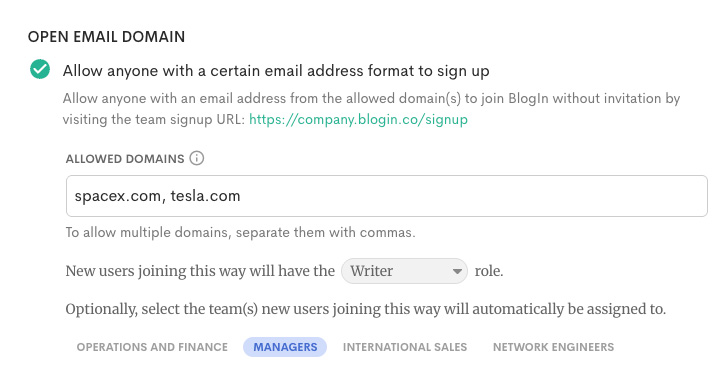
You can also choose which role and teams will be assigned to users who join the blog this way.
How users join the blog
Once Open Email Domain is enabled, users can join the blog themselves using their work email address.
For example, if your blog URL is https://company-name.blogin.co, users should go to the signup page at https://company-name.blogin.co/signup. They can also find a link to this page at the bottom of the login page. On the signup page, they simply enter an email address from one of the allowed domains.
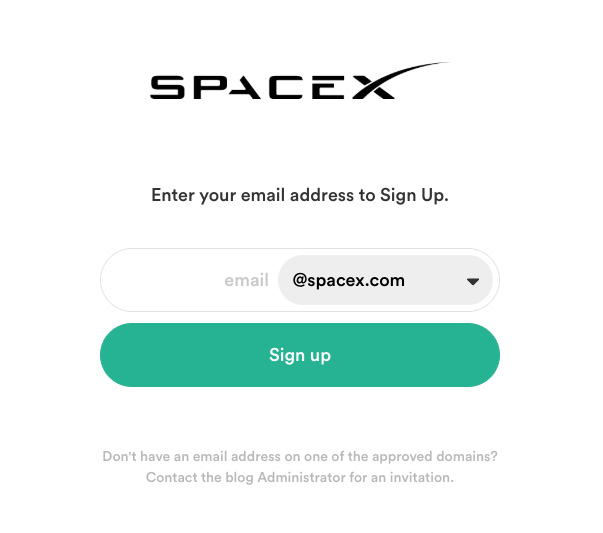
After submitting the form, they will receive an email with a secure link to complete their signup and set up their profile. Once their account is created, they can log in to the blog using those details. They will stay signed in until they choose to log out manually.
Step-by-step instructions for users:
- Go to your blog’s signup page, for example: https://company-name.blogin.co/signup
- Enter your work email address from an allowed domain.
- Check your inbox and open the signup email.
- Click the link in the email to create your account and set up your profile.
- Log in and start using the blog.
Note: Users can only sign up if their email address belongs to one of the domains allowed in the Open Email Domain settings.